HomeFeaturesPricing BlogAbout UsFAQContact Book Free Demo
Daily + Monthly + QR Kiosk · All Included

Student Attendance Management System

A digital attendance system for Indian schools — daily class attendance, session-wide register, QR-scan kiosk login, and auto absent-day alerts to guardian numbers. Replaces the paper register without breaking how teachers already work.

Holiday-aware Free SMS / WhatsApp bundle Multi-session support
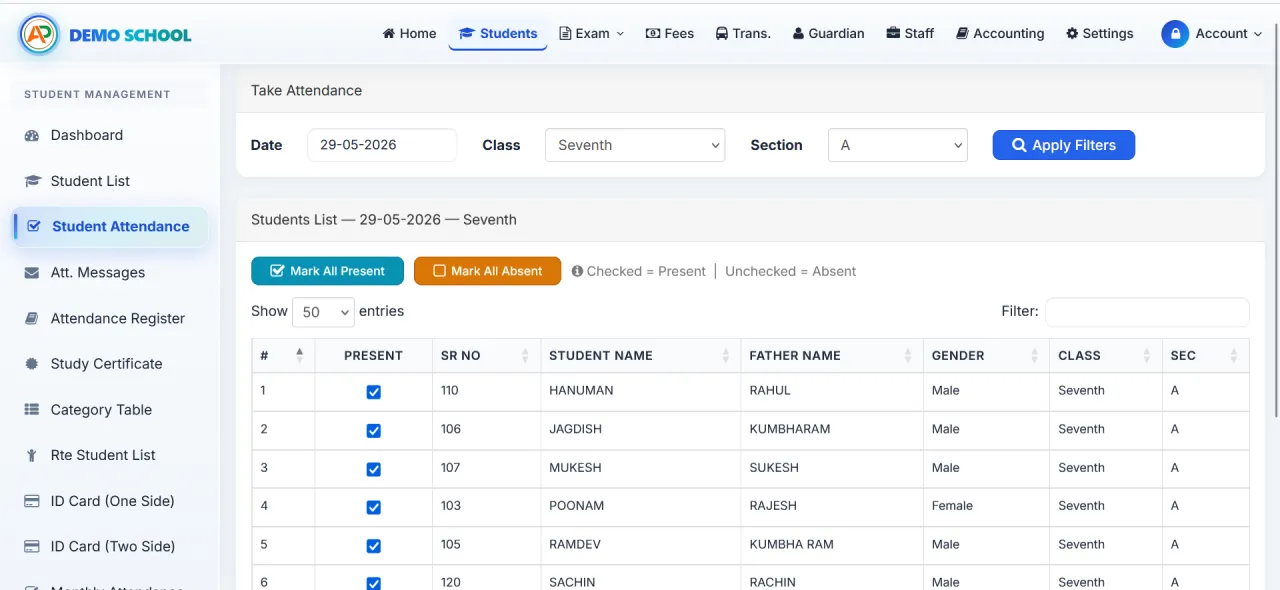
Student attendance screen — class-wise list with daily Present / Absent marking
Attendance Module

What the Attendance System Delivers

Designed around how Indian class teachers actually mark attendance every morning.

Daily Class Attendance

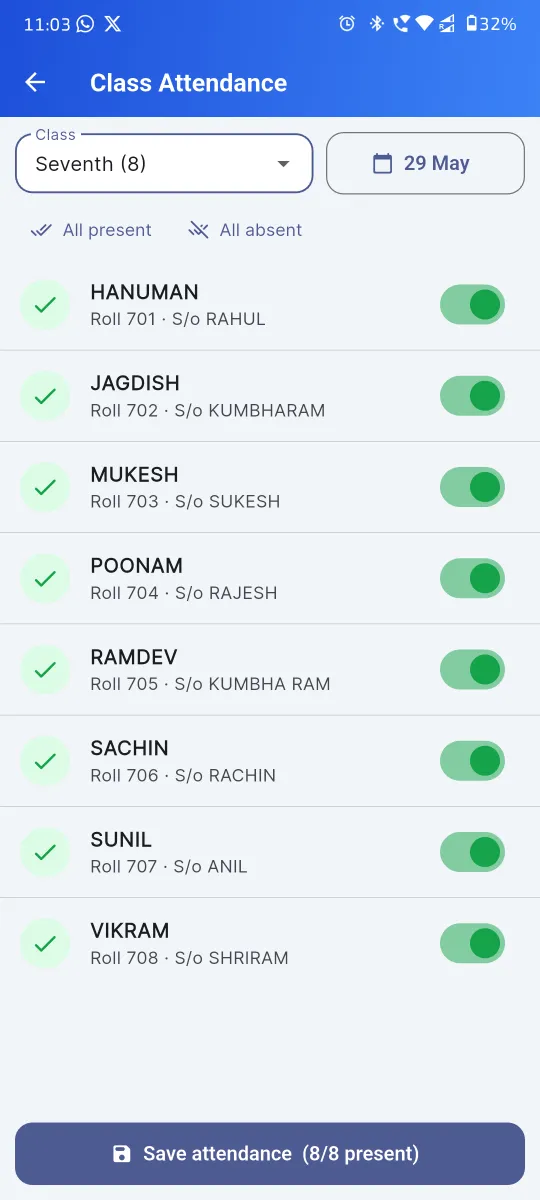
Pick a class — mark each student Present / Absent on phone or laptop. Under a minute per class of 40.

Session-Wide Register

Maintained automatically alongside the daily view. Pull a class register for any past day in seconds.

Monthly View per Student

Total working days, days present, days absent, attendance % — instant, exportable to PDF.

Holiday-Aware

Sundays + configured holidays (National / State / School / Religious) auto-excluded from working days.

QR-Scan Attendance Kiosk

Tablet at the gate; an “Attendance Only” user role for the security guard or peon — nothing else.

Absent-Day Auto-Notification

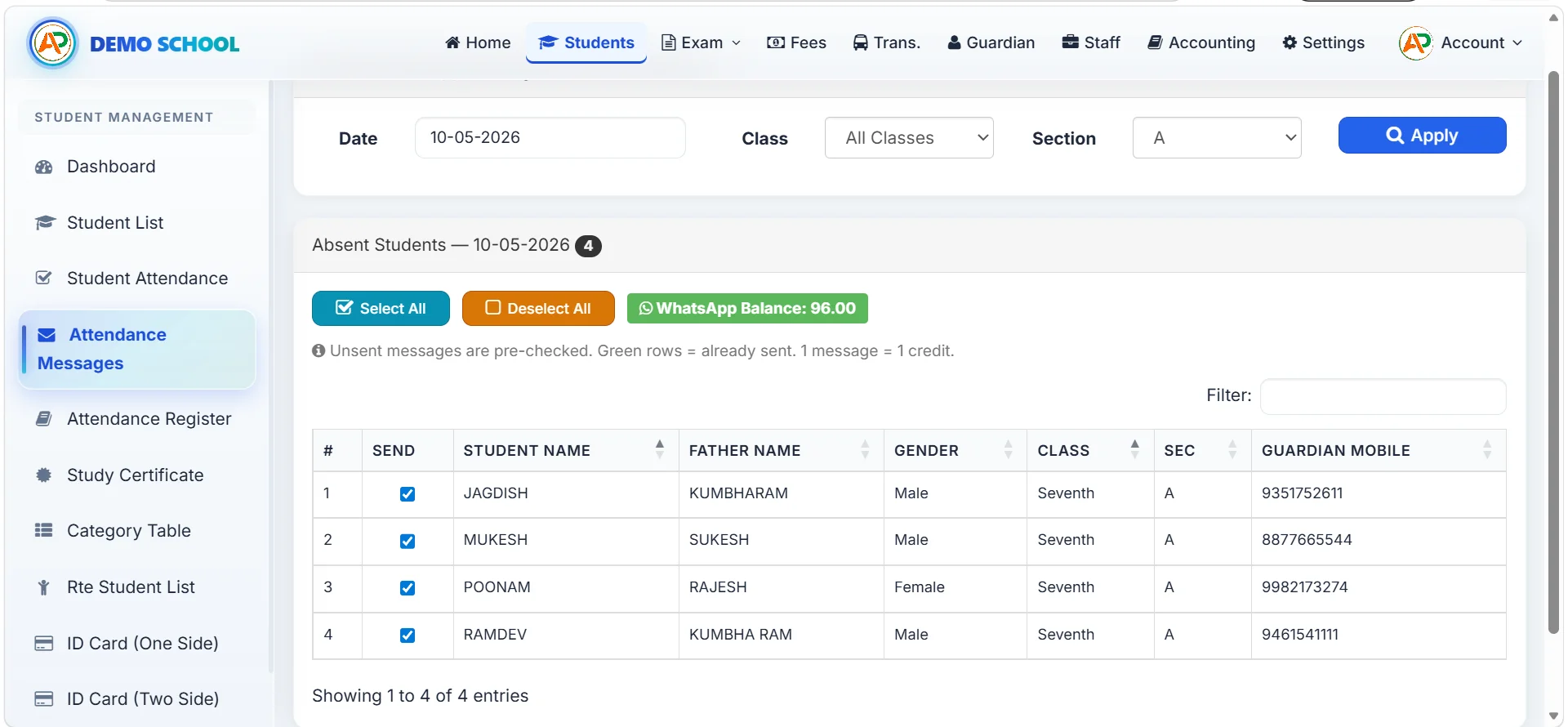
SMS or WhatsApp to guardian within minutes. Throttled, free bundle in every plan.

Multi-Academic-Session

Last year’s attendance is preserved when you roll forward. Audit-ready export anytime.

Feeds Staff Payslip

Parallel staff-attendance module marks Present / Absent / Half-Day / Leave; working-days drives monthly payslip.

Why the absent-day SMS / WhatsApp matters

The piece parents value most isn’t the register itself — it’s the alert they get within minutes if their child is absent. It transforms attendance from a passive record into an active safety alarm. Every Apna School plan ships a free bundle — utility messages only (fee, attendance, exam results); no marketing.

Read the Attendance Guide
Class-wise student list with attendance
How It Works

Three Flavours of Digital Attendance

Apna School ships web/app entry plus the QR-scan kiosk. Hardware biometric stays optional / third-party.

1

Web / App Entry

Most common. Class teacher opens the screen on phone or laptop, marks Present / Absent.

2

QR-Scan Kiosk

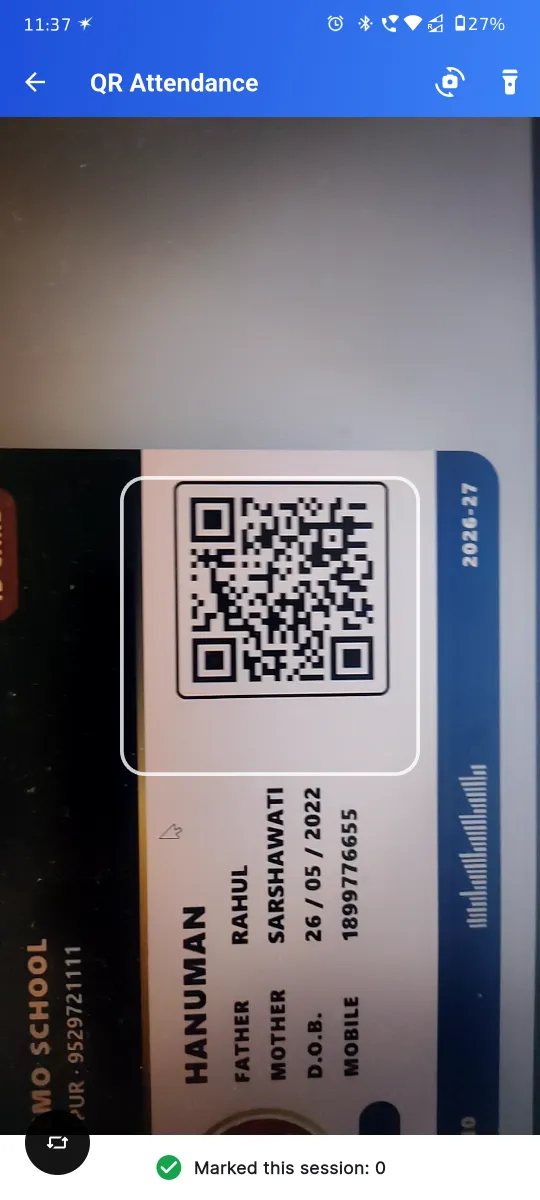
Tablet at the gate; each student scans their QR ID card on arrival. Security guard runs it.

3

Absent-Day Alert

SMS / WhatsApp goes to guardian mobile within minutes — throttled to one per child per day.

4

Monthly Audit

Export class-wise / student-wise monthly register to PDF for RTE / board inspections.

Pricing

Attendance Included on Every Plan

🌱
START
₹4,999/yr
Up to 250 students
View plan
📚
SMART
₹8,999/yr
Up to 500 students
View plan
👑
PREMIUM
₹24,999/yr
Up to 1,500 students
View plan
FAQ

Student Attendance FAQ

Apna School ships three attendance modes built directly into the platform: (1) class-teacher web / Android-app entry (a 30-second tap-mark workflow per period), (2) the QR-scan kiosk at the school gate (every student gets a unique QR on their I-Card; one tap and the student is marked Present with timestamp), and (3) bulk attendance entry from the office. Hardware biometric (fingerprint / face) integration is on our active product roadmap and rolling out shortly. Until then, schools that need fingerprint hardware today can use a third-party biometric device alongside Apna School — the QR-kiosk pattern actually performs faster than fingerprint in queue conditions (no contact, no “please try again”). Read more in our digital attendance via I-Card guide.

Yes — the Android attendance app and any mobile browser both work. Each class teacher logs in with their employee credentials and sees only the classes they’re authorised to mark, courtesy per-employee role-based permissions. The interface lists the day’s class roster with a one-tap Present / Absent toggle (default Present, mark only the absentees — the fast-mark Indian-school workflow). Marking 40 students takes under a minute. The data syncs instantly to the cloud, the office sees live updates, and absent-day WhatsApp / SMS alerts to parents fire automatically. Even on patchy 3G in Tier-3 cities, the app handles offline queueing and syncs when connectivity returns.

Sundays are auto-excluded from the working-day count (no need to mark them as holidays each week). Other holidays are configured once on the school’s holiday calendar, with five categories Indian schools actually use: National (Independence Day, Republic Day, Gandhi Jayanti), State (Rajasthan Day, Maharashtra Day, etc.), School (founder’s day, sports day, exam-prep break), Religious (Diwali, Eid, Holi, Christmas, Raksha Bandhan), and Other (election holidays, weather closures). All categories auto-exclude from working-day count; monthly attendance reports automatically subtract them. This means staff salary computation (which depends on working days) and student attendance percentage (which depends on actual school days) are both correct without manual tinkering.

No — absent-day alerts draw from your plan’s free WhatsApp + SMS bundle. There are no per-message charges within the bundle, no “attendance alert add-on” pricing, no surcharge for WhatsApp vs SMS. Each plan ships a generous starter bundle: START covers a small school’s daily absent alerts comfortably, SMART / SUPER / PREMIUM scale up. If a school exhausts the bundle (rare), additional credits are available at fair pay-as-you-use rates. The cost-per-alert is essentially zero for most schools — which is what makes daily absent-day alerts a practical, not aspirational, feature.

Yes — monthly attendance reports are one-click PDF exports. Each report shows the student’s name, class, admission number, the month’s daily attendance grid (Present / Absent / Holiday / Sunday for each date), total working days, total present, total absent, and attendance percentage. Reports can be generated per student (for parent collection at month-end), per class (for the class teacher’s file), or for the entire school (for principal review). The session-wide attendance register aggregates the full year. For UDISE+ submissions, class-wise annual attendance summary is also exportable. Schools running QR-kiosk-based digital attendance get the cleanest data because every entry has a timestamp.

Yes — the staff attendance + payslip module runs on the same backbone as student attendance. Staff are marked Present / Absent / On Leave / Half Day daily; the attendance feeds directly into the monthly payslip computation. The payslip auto-computes Basic + HRA + Other Allowance, deducts Provident Fund (PF) and any other deductions, and arrives at Net Pay using the working-day count from the holiday-aware calendar. Payslips can be PDF-exported, printed and posted to the accounting cash book in one click. This eliminates the “every Sunday the accountant types out 40 payslips” tax that drains 6+ hours per month at most schools. Read more on the time-savings math in our 10+ hours saved per week guide.

The QR-kiosk attendance system turns any tablet or laptop at the school gate into a one-tap attendance kiosk. Every student gets a unique QR code printed on their school I-Card (auto-generated by Apna School — no separate ID printing software needed). On arrival, the student presents the I-Card to the kiosk camera; the QR is read in <1 second; the student is marked Present with an arrival timestamp; an entry-confirmation WhatsApp / SMS to the parent fires automatically (“Your child has reached school at 7:42 AM”). Compared to fingerprint biometric, QR is faster (no contact / no retry), more hygienic (post-COVID norm), works for younger students (Class 1 onwards) where fingerprint is unreliable, and zero-cost on hardware (any cheap tablet works). Full walkthrough in our digital attendance by I-Card blog.

Yes — per-employee role-based access control (RBAC) is enforced throughout. The principal assigns each teacher to specific classes / sections; in the attendance app, the teacher sees only their authorised roster. A Class 5-A teacher cannot mark attendance for Class 6-B; a subject teacher who teaches across classes is assigned the relevant set; an admin / principal sees all. The same RBAC rules apply to attendance reports (a class teacher can pull their own class’s monthly report but not someone else’s). This protects student-data privacy, prevents accidental cross-marking, and creates a clean audit trail of who marked what, when. RBAC works the same way across the fee, exam, and accounting modules.

Replace the Paper Register This Term

See web + app + QR-kiosk attendance live in 30 minutes.